
How to Retrieve Photos From a 100,000-Image Library
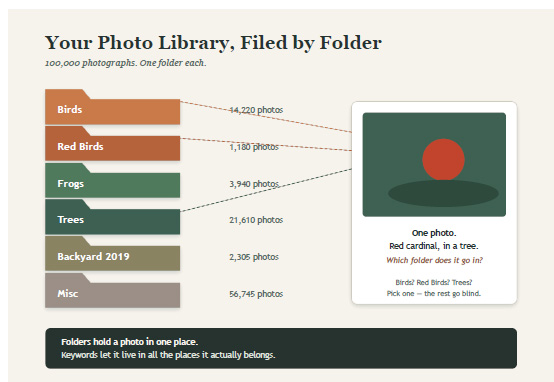
If you’ve got 100,000 photographs and a folder structure like Birds, Red Birds, Frogs, Trees, you already know the problem: folders force every photo into exactly one bucket. A photo of a red cardinal in a tree has to live in one of those folders — Birds? Red Birds? Trees? — even though it belongs in all three. Multiply that by 100,000 images and you get a system that only works if you remember, months later, which bucket you guessed right the first time.
The core problem: folders are single-purpose, photos aren’t. A folder is a location. A photo can only have one location. But a photo has many attributes — species, color, location, season, lighting, camera settings, the person who took it. The moment you need to cross a second attribute (“show me all red birds shot at golden hour”), folders stop working, no matter how cleverly you name them.
Then do all your actual organizing with keywords/tags, not folders. Every photo gets multiple keywords: bird, cardinal, red, tree, backyard, spring. Now a search for “red bird” or “bird AND tree” just works, because you’re filtering metadata instead of hunting through nested folders.
Where to put the keywords
Write them into the file itself using IPTC/XMP metadata, not just a database. Tools like Adobe Lightroom, digiKam, or ExifTool let you batch-apply keywords, and because the tags live in the file, they survive if you switch software or move files around. A catalog-only tool (tags stored in an app’s private database) breaks the moment you migrate.
Attacking the backlog
With 100,000 photos and “most without” keywords, don’t try to hand-tag everything at once:
1. Batch-tag by shoot or folder first. If a folder is “Yellowstone 2019,” select all and add yellowstone, 2019, wildlife in one pass — instant 80% improvement for zero per-photo effort.
2. Let AI do first-pass recognition. Digikam, Lightroom, and Google Photos can auto-detect species, objects, and faces. Review and correct rather than tagging from scratch.
3. Tag a controlled vocabulary, not free text. Decide up front: is it “bird” or “birds”? “Cardinal” or “red cardinal”? Inconsistent tags fragment your search results. Keep a short master list.
4. Use hierarchy where it helps. Many tools support nested keywords (Animal > Bird > Cardinal), so searching “Bird” also catches every cardinal, robin, and blue jay tagged beneath it — you get folder-like browsing and flat-tag searching at once.
The habit that actually matters
None of this works long-term unless tagging happens at import, not “eventually.” Build a five-minute step into your workflow — even three broad keywords per shoot — right when photos come off the camera. A perfect tagging system applied to zero new photos is worse than a rough one applied to all of them. Keep a simple physical structure for storage — by date is usually best, since it’s unambiguous and never requires a judgment call.